Показаны сообщения с ярлыком iSight. Показать все сообщения

воскресенье, 26 апреля 2015 г.

Как сделать дроида из «Звездных войн» своими руками?


Используя роботизированный шар Sphero, управляемый через Bluetooth, можно сделать множество разнообразных гаджетов. Например, миниатюрную копию космического дроида BB-8 из «Звездных войн».


BB-8, впервые показанный в эпизоде «Звездные войны. Эпизод VII: Пробуждение Силы», имел шарообразное тело, окрашенное в белый цвет с небольшими оранжевыми вставками, и куполообразную голову. Передвигался он с помощью вращения тела, а на голове у него был черный окуляр.
Sphero представляет собой небольшой шар из прочного поликарбоната, внутри которого находится электромотор. Благодаря Bluetooth-интерфейсу вращением шара можно управлять на расстоянии до 15 метров. Аккуратно распилив шар ножовкой, нужно поместить одно кольцо из неодимового магнита на внутреннее шасси, которое прижмет его к внутренней поверхности сферы, а затем склеить шар обратно и покрасить его в цвет дроида.
«Голова» BB-8 моделируется в программе Rhinoceros по кадрам из фильма, а затем вырезается из пенополиуретана и красится. Второе магнитное кольцо приклеивается к нижней части «головы» дроида — и робот готов к использованию! Управлять BB-8 можно с помощью приложения Sphero для iOS.

воскресенье, 29 марта 2015 г.

Why This Weird Future Airliner Has No Windows

windiwless plane


 Head in the clouds? UK developers are working on removing windows in planes to save weight and fuel, replacing them with smartscreen panels broadcasting the view. Photograph: Tomasz Wyszo/mirski/ww.dabarti/CPI
It is a glimpse into the future that will inspire wonder in some people but perhaps strike terror into the heart of the nervous flyer: a windowless plane that nonetheless allows passengers to see what’s going on outside, as well as checking their email and surfing the net.
In a vision of what the next generation of commercial aircraft could look like in little more than a decade, windows would be replaced by full-length screens allowing constant views of the world outside. Passengers would be able to switch the view on and off according to their preference, identify prominent sights by tapping the screen or even just surf the internet.
The early-stage concept for the windowless plane, based on technology used in mobile phones and televisions, hails from the Centre for Process Innovation (CPI), an organisation with sites across north-east England that works with companies to develop new products. It imagines how large, hi-definition, ultra thin and lightweight displays could form the inside of the fuselage, displaying images of the exterior from cameras mounted on the plane’s exterior.
But the real ambition echoes a constant quest in the aviation industry: how to reduce weight, which would cut fuel consumption, thereby bringing down fares. According to the CPI, for every 1% reduction in the weight of an aircraft, there is a saving in fuel of 0.75%.
The idea came about after discussions about how printable electronics, in which the centre specialises, could be used. “We had been speaking to people in aerospace and we understood that there was this need to take weight out of aircraft,” said Dr Jon Helliwell of the CPI. By putting windows into a plane, the fuselage needed to be strengthened, he added, and by omitting them in favour of walls of screens on panels, the fuselage would be lighter.
“Follow the logical thought through. Let’s take all the windows out – that’s what they do in cargo aircraft – what are the passengers going to do? If you think about it, it’s only really the people that are sitting next to windows that will suffer.”
These futuristic plans would involve screen panels reflecting whatever view of the outside the passenger wanted, changing in accordance with the direction of their eyes.
The screens would be made using organic light-emitting diodes (OLEDs) – a combination of materials that give out their own light when activated by electricity. The problems with the technology involve price and their sensitivity to moisture, which means they are generally encased in inflexible glass, mostly in mobile phones and televisions. The key development, said Helliwell, would be flexible OLEDs, which would allow the creation of screens suitable for an aeroplane. Electronics company LG recently posted a video of an 18-inch (46cm) screen which bends and contorts while the images on screen are broadcast uninterrupted.
“What would be great would be to make devices based on OLEDs that are flexible. We can make transistors that are flexible but if we can make OLEDs that are flexible, that gives us a lot of potential in the market because we can print OLEDs on to packaging, we can create flexible displays,” he said.
The CPI is one of seven bodies under the High Value Manufacturing Catapult, an umbrella group which receives government funding to drive growth in manufacturing. Part of the way the CPI operates is to identify challenges in industry – such as the windowless plane – and develop ways to overcome them, according to Helliwell.
Using £35m worth of advanced equipment in its Sedgefield facility, the CPI says it working on technologies to advance flexible OLEDs and tackle problems of cost and durability.
This could lead to the development of the OLEDs and the windowless plane, but could also be used in “smart packaging” for medicines or food which would contain information that could be displayed on a mobile phone.
One of the first steps in developing OLEDs is a mask which helps treat eye disease among people with diabetes. The device from PolyPhotonix, which was developed at the CPI, aims to stop the breakdown of blood vessels during sleep as a result of the disease. Using the device, the eye is fooled into thinking that it is daytime, when there is not the same problem with blood vessel breakdown.
The concept for the plane, said Helliwell – letting passengers see outside while allowing a lighter fuselage – followed discussions with the aerospace industry. The idea of having the displays lining the inside of the plane could become reality in 10 years, after other “building blocks” in the development of OLED are completed, he added. “We are talking about it now because it matches the kind of development timelines that they have in the aerospace industry.
“So you could have a display next to a seat if you wanted it; you could have a blank area next to a seat if you wanted it; you would have complete flexibility as to where you put [the panel screens]. You could put screens on the back of the seats in the middle and link them to the same cameras.”

What are OLEDs

OLEDs are a combination of advanced materials that give out their own light when activated by electricity and are typically used to make screens and lighting. Unlike LCD and plasma displays, they do not need a backlight, meaning that they use less energy and can be much thinner than other displays, while also displaying a higher contrast. Among ambitions for OLEDs involve printing them on sheets or wallpapering them on rooms, effectively turning the walls into lights.

пятница, 27 марта 2015 г.

Drones glimpse inside the Fukushima nuclear plan


An image of a hot spot that has been identified and mapped inside one of the reactors
State-of-the-art British imaging technology has been deployed at Japan's crippled Fukushima nuclear plant to overcome problems that Japanese engineers declared to be insurmountable.
Designed by Cumbria-based Createc, N-Visage cameras have been mounted on remote-controlled drones and caterpillar-tracked robots that can navigate the insides of the three reactor buildings that suffered melt-downs after an earthquake and tsunami hit Fukushima in 2011.
Coupled with unique software, the £200,000 system is able to create a real-time, three-dimensional image of the area being surveyed and identify "hot-spots" of radioactivity.
More than four years after the second-worst nuclear accident in history, radiation levels within the structures remain too high for humans to enter.
That has severely hampered efforts to determine the problems that need to be solved to safely decommission the reactors and clean up the site. Experts have already estimated that process will take three decades but progress to date has been slow.
Tokyo Electric Power, the operator of the plant, was only able to confirm on Thursday previous suspicions that nearly all the fuel from the No. 1 reactor at the plant has melted and fallen into the containment vessel. Two more reactors appear to have experienced similar fates and Tepco is now conducting further tests to confirm that assumption.
"There was some scepticism from Tepco when we were first introduced to their representatives in the UK in April 2012, but they very quickly saw the possibilities", said Dr Matt Mellor, director of Createc.
"One of their guys said it was like finding a Picasso in the loft because their experts had told them that what we do was impossible", he added.
Working in tandem with nuclear unit of Hitachi-GE Nuclear Energy, Createc engineers first visited the Fukushima plant in 2013.
"It was a shocking sight", said Dr Mellor. "Even more than a year after the tsunami, the damage to the reactors was clear. Vehicles were still laying around the site, fences had been crushed, storage tanks had been flattened and radiation levels in the immediate area of the reactors was still very high.
"Nuclear sites are usually tidy and organised because they have to be, so it was clear this was going to be a major challenge from the outset", he added.
As well as using remote-controlled vehicles to get the N-Visage system into the damaged buildings, engineers drilled holes through the roof and lowered imaging equipment into the interior.
Createc has permitted Japanese nuclear engineers to undertake a "virtual walk" through the plant and has mapped areas with the very highest concentrations of radiation, which will in the future enable engineers to shield and isolate such "hot spots".
"It has blown the socks off the engineers at Fukushima," said Pete Woolaghan, a director of Createc. "We have been able to give them an accurate and exact image of the dose environment that they are faced with, which is enabling them to formulate plans with far more certainty and safety.
"Previously, they were working with educated guesses".
The N-Visage system has been deployed at plants that are undergoing decommissioning processes in the UK, including Sellafield, and has attracted interest from the US nuclear industry.
The Japanese government has this month announced plans to decommission five nuclear reactors, the first time that Japanese plants will have been dismantled. With limited experience and capabilities in this specialist area, Createc and other British firms are anticipating an increase in opportunities in Japan.

Simply stunning videos filmed with a Drone

Earlier I was on Youtube checking out videos that people all over the World filmed with remote controlled Drones and I was blown away. I bet if you are a photographer by now you may have already pondered the thought of catching some brilliant shots with these. Below I posted some videos that I thought were so good that they should be shared. The quality of some of these background shots with location are simply magnificent. A lot of Industries like Photography and Real Estate can really benefit from this technology and I can only expect more and more professionally shot Drone videos to be produced as time goes by.

At the 1:20 mark of this video the Drone flies over a Volcano! Being able to film shots like that while dodging chunks of lava flying at an expensive camera is what made this spectacular footage.

Below are some awesome shots from around the World. At the 1:50 mark they catch a great night time view of the City.

At the 30 second mark of this compilation of videos you will view one of the best shots I have ever seen so far. I might be wrong but I bet that part was filmed some where in Central Florida.


DJI Phantom 2 Vision + Long Term Review

In part #1 of this long term review, we discussed the basics of getting the P2V+ setup and the first flight(s). As a result, it was time to venture further afield with our test Phantom.

Finding Places to Fly
For some this is very easy – for others a bit more difficult. My current testing grounds in Florida are quite crowded at this time of year – and, frankly, some of the very flat and sparse areas here are not worthy of good photo and video. I looked a google maps and decided to try some tricks to find new flying areas…
1. I put an ad on Craigslist in the photo section – saying I would take some free photos and video for owners of larger property, etc.
2. I contacted the admin of a local botanical park and offered to take video and photos on their 10 acre grounds.
I received replies from both which were promising – the Botanical Garden, Palma Sola Botanical Gardens, was very pleased and invited me up at my leisure to fly on their property! Bingo!

Installing Propeller Guards
Before I ventured out I decided to add the propeller guards and a lens hoods to my Phantom. These were in addition to the homemade bottom gimbal protector and the Phantom Fix gimbal protector I had already added in post #1. The prop guards protect against many a mishap – even small bumps against trees, bushes, etc. without them can result in the Phantom being flipped and harmed. The same goes for people and pets – without the prop guards, the Phantom is more dangerous.
Installing the prop guards is simple – however, some Phantom owners have messed up their birds when installing or removing them, so pay attention to the basics! You’ll need a Torx driver T8 – as shown. The prop guards come with two Torx screws each – installing them requires you to remove the two existing (shorter) Torx screws from the underside of each arm and replace them with the prop guards and longer screws.
Remove the two small T8 screws
Remove the two small T8 screws – shown on top right. Install prop guards and longer screws (shown on left above). Store the old shorter screws for later use if you remove prop guards.
Pro Guards Installed
Watch out for these potential problems:

"; -->

1. Do not over tighten the new longer screws – they are two of the 4 screws that hold the motors in – just snug will do as they contain thread locker on the shaft.
2. If and when you remove the prop guard, do not attempt to use the longer screws or they will hit – and ruin – the motors. Save the shorter screws (label the bag) and use them if you remove the guards.
One disadvantage of the prop guards is that they can enter your pics and video when the Phantom is in certain positions. A sample pic is shown below. In some cases you can simply crop out or otherwise cover (by duplicating background, etc.) the guards. I may eventually remove part of the front guards as a compromise, as I don’t like them showing up in my HD videos.
Sample Picture with Prop Guard Showing
Sample Picture From Botanical Garden with Prop Guard Showing

Back in the Air!
After installation of the prop guards I was ready to visit the local Botanical Gardens and get some pics and video. A stiff breeze was present, so I didn’t venture too high or too far, but I did fly two missions (two batteries) each flight making certain that the Phantom knew where it was (confirming the home point on the Find my Phantom Screen). The gardens had large lakes and ponds – but I’m still being conservative with the Phantom, so I didn’t fly across them. Here are a couple pics – click to enlarge them.
Palma Sola Botanical Garden, Brandenton FL.
Picture and Video Hints
There is a tendency for aerial photographer to think “the higher the better” but this turns out to be false, especially in the case of video. Pilots should consider the best angles, lighting and views of the subject at hand. The short example video clip below will illustrate this point. It’s just a draft video of a couple shots, but you can see how some low altitude views can be pleasing.

First Flights – First Mishap!
A point which I constantly make is that all hobby aircraft – or at least most – will have “unscheduled landings” (crashes). While I may have written the book, I still had a mishap on the day I filmed at the Botanical Gardens. Here is what happened – I was flying the Phantom relatively low and completely under control. The battery was getting low – about 32% – so I brought the Phantom down to about 10 feet high and filmed the walking path in the gardens…intending to land it within 30 seconds or so. Suddenly the Phantom developed a mind of it’s own and shot upwards – hit a tree and tumbled over and ended up in a bush nearby. Luckily there were no spectators close by, but it was quite near a pond and a parked BMW – in other words, this little crash could have cost me big! Luckily it ended up in a Bush – AND, some of the protection I had installed probably saved the day. The bottom guard protected the camera and gimbal and the lens hood further protected the lens. The prop guards probably helped also. Here is a pic of the Phantom after the crash – as you can see the bottom guard took a hit from the bush or tree (I replaced it already).
Phantom after the mishap - all systems still worked perfectly.
Phantom after the mishap – all systems still worked perfectly.
So, why the crash? Apparently the Phantom has a setting whereby it automatically enters into the RTH (Return to Home) phase when the battery hits 30%. I wasn’t following an important rule – that is, to make sure I landed before the battery hit about 35-40%. I thought, wrongly, that having the Phantom within a few feet of the ground would render it safe – but instead it attempted to rise to the RTH altitude and go back to where it took off from – resulting in the crash.
This particular setting is confusing because it is in more than one place….this confirms the complexity of the Phantom software. There is one setting for this in the DJI Vision App (I had this set to off), but there is another setting for it in the internal Phantom firmware. I will have to hook the quad up to my computer if I want to turn this off. Some users may want it left on – but I prefer to have manual control over my Phantom at all times since I am usually flying within easy sight and control of my bird.
Lesson learned….now I start to think about landing at 50% battery and make sure I am down when the battery hits 40%. Flying on a low battery is just too risky.
Another Place to Fly!
I noticed a nice shot of a local church in my first set of pics, so I sent a copy along to the church (found their web site) and also offered to shoot some other pics for them. They really liked the pic and invited me to take pics and video on their property – you can see some parts of the footage in the sample video clips above – here is a still pic of the same church:
Church in Sarasota Florida

Finding places to fly can be difficult – but if you think about it, there are lots of churches, golf courses, etc. which may be very happy to have you offer to take some aerial views of their properties. Takeaway Points from part #2 of our Long Term Review
1. Be creative in seeking out possible places to fly and take aerial photos and footage.
2. Install prop guards and other protective measures as additional insurance against crashes.
3. Be very aware of the various automatic functions of the NAZA Flight controller as regards battery levels and return to home. For the beginner, follow this advice:
A. When the battery hits 50% head back to home or to a landing area relatively quickly.
B. If the battery is at 40% you should be in “Emergency Mode” and planning to land as quickly as possible.
C. Always make certain your Home Point is correctly set (the Phantom knows where it is) by checking the “Find my Phantom” feature in the DJI Vision App. However, Return to Home (failsafe) functions should never be used when ANY other method of landing is possible – because the Phantom cannot avoid trees, powerlines, etc. when in automatic RTH mode.
Note – this is part #2 of our long term review – you can find part #1 here.
In the next part of this series we will address some of the video and picture options as well as give hints on getting and editing decent footage. In addition part #3 will contain additional technical hints and shortcuts to safe and successful piloting and use.
Note – if you are looking for a Phantom, the prices have recently been lowered quite a bit – savings of about $200 make the price closer to $1100 for the Phantom 2 Vision+. Here are some links to current models and pricing:
DJI Prices and worldwide shipping on Phantoms

среда, 25 марта 2015 г.

Putting Drone Videos on YouTube Is Illegal, Feds Say

The Federal Aviation Administration is still scrambling to decide how to regulate drones in American airspace, but there's at least one thing we know for sure: You're not supposed to use drones to make money. Well, even that isn't as clear as we thought.
This week, Motherboard says, the FAA sent a scary letter to drone lover Jason Hanes, telling him to stop posting his drone videos to his website or he'd be subject to fines. The reason: Those videos are on YouTube, and YouTube has ads, therefore he's using drones to make money.
It's a strange case. Clearly the FAA rules are targeted at business that would use UAVs for a specific commercial purpose, such as Amazon's proposed fleet of delivery drones, or drones that would carry banner ads behind them as they fly over a crowded beach. Hanes would appear to fall into the hobbyist category that the FAA has mostly left alone (as long as those hobbyists keep their aircraft away from football stadia, bridges, and the White House).
Yet his case could have repercussions for all kinds of hobbyist drone pilots who like to share their videos, many of which you've seen right here at PM. Says Motherboard:
Where, exactly, does commercial use begin and hobby use end, for instance? If you fly for fun, but happen to sell your footage later, were you flying for a "commercial purpose?" What if you give it to a news organization that runs it on a television station that has ads on it? What if you upload it to YouTube and Google happens to put an ad on it? What if you decide to put an ad on it?
Legally, it looks like FAA just opened a big ol' can of drones.
Source: Motherboard

вторник, 24 марта 2015 г.

Дизайнер представил проект беспилотника Apple

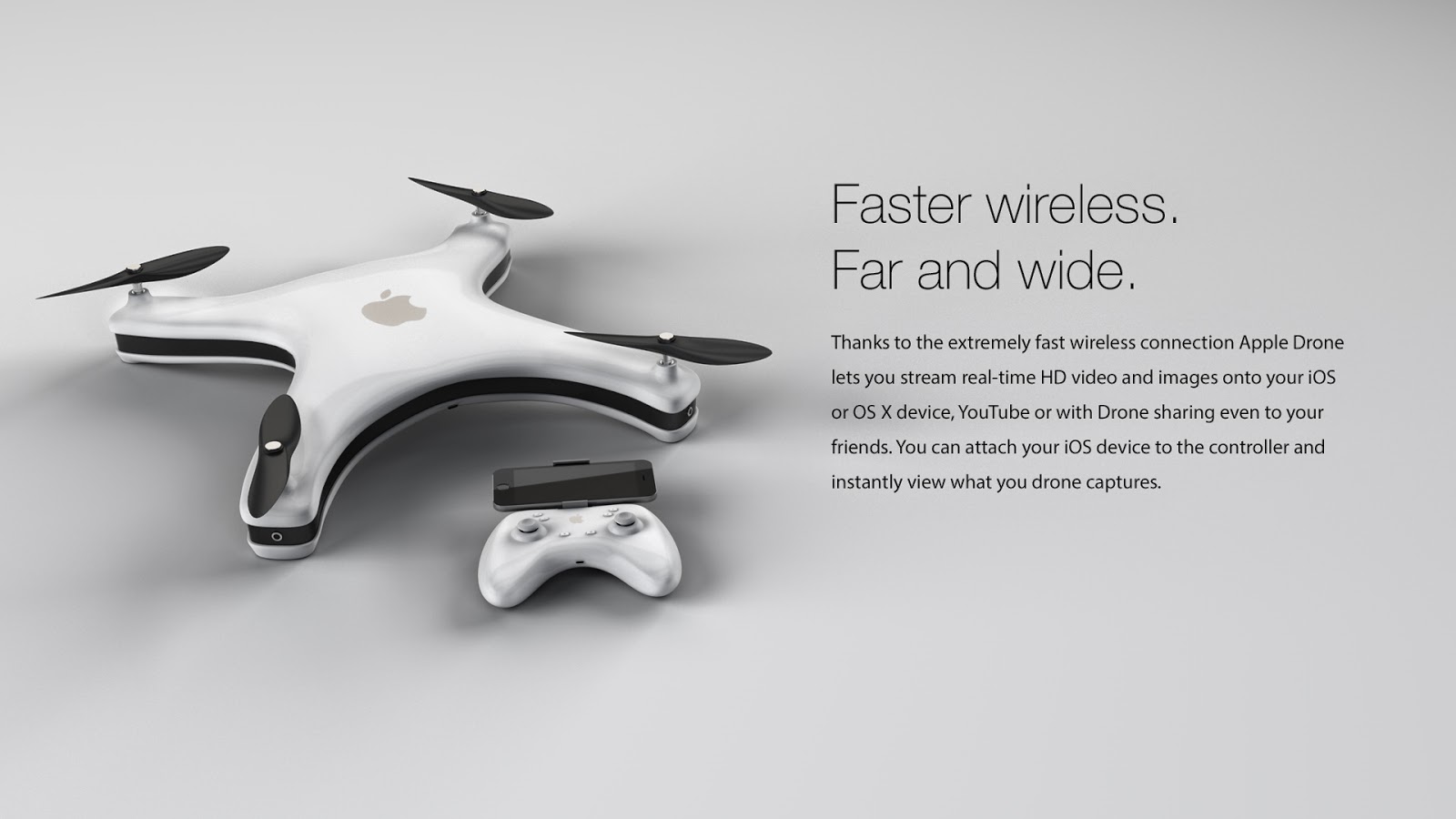
Немецкий дизайнер Эрик Хьюсманн представил свое видение концепции будущего дрона компании Apple.

Как пишет Breaking News, по проекту беспилотник оснащен четырьмя камерами iSight, встроенными в «ноги» дрона, со сверхвысоким разрешением 4K. Гаджет сможет транслировать HD-видео в реальном времени на iPhone или iPad владельца. По замыслу дизайнера, дрон также сможет делать панорамную съемку.

©quadrocopter.org

Эрик Хьюсман уже не первый раз готовит прогнозный дизайн для будущих устройств Apple, и нельзя сказать, что он ошибается. К примеру, в 2013 году он представил концепт «умных» часов iWatch, который в итоге не сильно отличался от представленных позднее наручных устройств.
©quadrocopter.org

Напомним, слухи о запуске Apple в производство собственных дронов ходят уже не первый год. Они активизировались после новости о том, что разрешение использовать беспилотники для доставки получил онлайн-ритейлер Amazon. 

Naked Science
http://naked-science.ru/article/concept/dizainer-predstavil-proekt-bes


Naked Science
http://naked-science.ru/article/concept/dizainer-predstavil-proekt-bes